The website people see depends on systems they don’t.
A contact form can look like it works while messages quietly never reach the office. Analytics can report confidently while measuring the wrong thing. A URL can be changed in ten seconds and take years of search history with it. None of that is visible on the page.
Search visibility isn’t only content and keywords. A business website runs on an operating system underneath it—domain and DNS, hosting, the CMS, caching, security, updates, backups, staging, crawlability, analytics and ownership. FLOWLINE evaluates that system before recommending change.
The platform has to support what we’re asking the website to become.
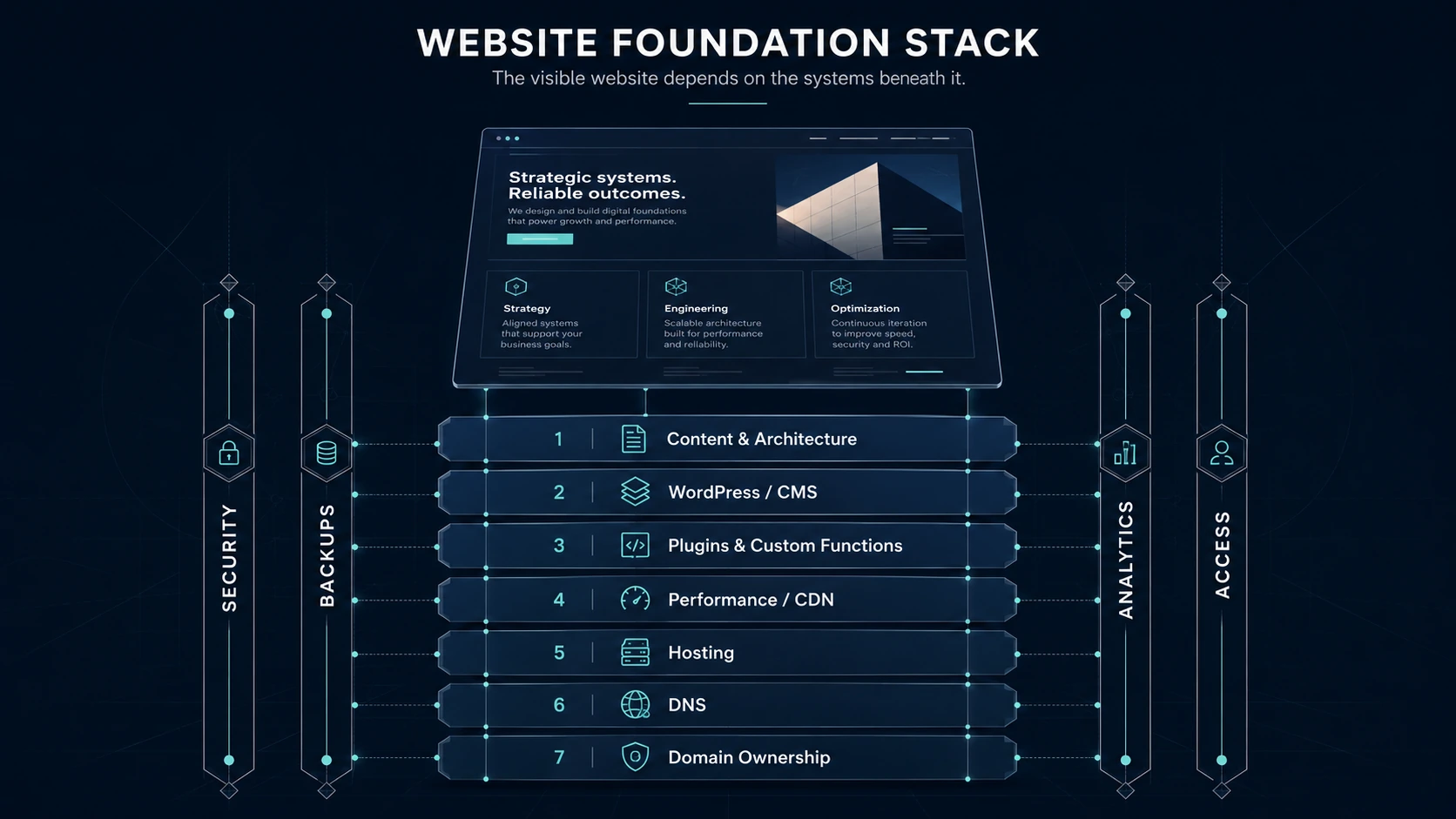
The visible website is only the top layer. Content and architecture sit on the CMS, plugins, performance/CDN, hosting, DNS and domain ownership—with security, backups, analytics and access running through every layer.
Infrastructure decides what can safely be built.
New service and location pages, media, schema, forms, analytics, call tracking and conversion features all depend on the platform underneath them working reliably. This isn’t housekeeping separate from growth—it is part of growth.
Performance
Page weight, media, render-blocking scripts and layout stability affect real users and crawl efficiency—not just a score.
Reliability
Downtime, broken DNS or failed email delivery costs calls. A lead-generating site has to stay up and stay reachable.
Crawl & indexing
Changing a URL without redirecting the old one properly throws away search history that took years to earn. Response codes, canonicals, redirects, sitemaps and robots controls must not obstruct the content strategy.
Lead delivery
Forms, SMTP, CRM hooks and call tracking are dependencies. If they break silently, the marketing didn’t happen.
Editability
Business content should stay natively editable by the team—not trapped in opaque one-off code.
Measurement
Search Console, Analytics and lead-source data have to survive vendor changes and remain the company’s.
Inventory before prescription.
You cannot safely recommend removal, migration, consolidation or replacement until the dependencies are known. Every foundation review follows the same path.
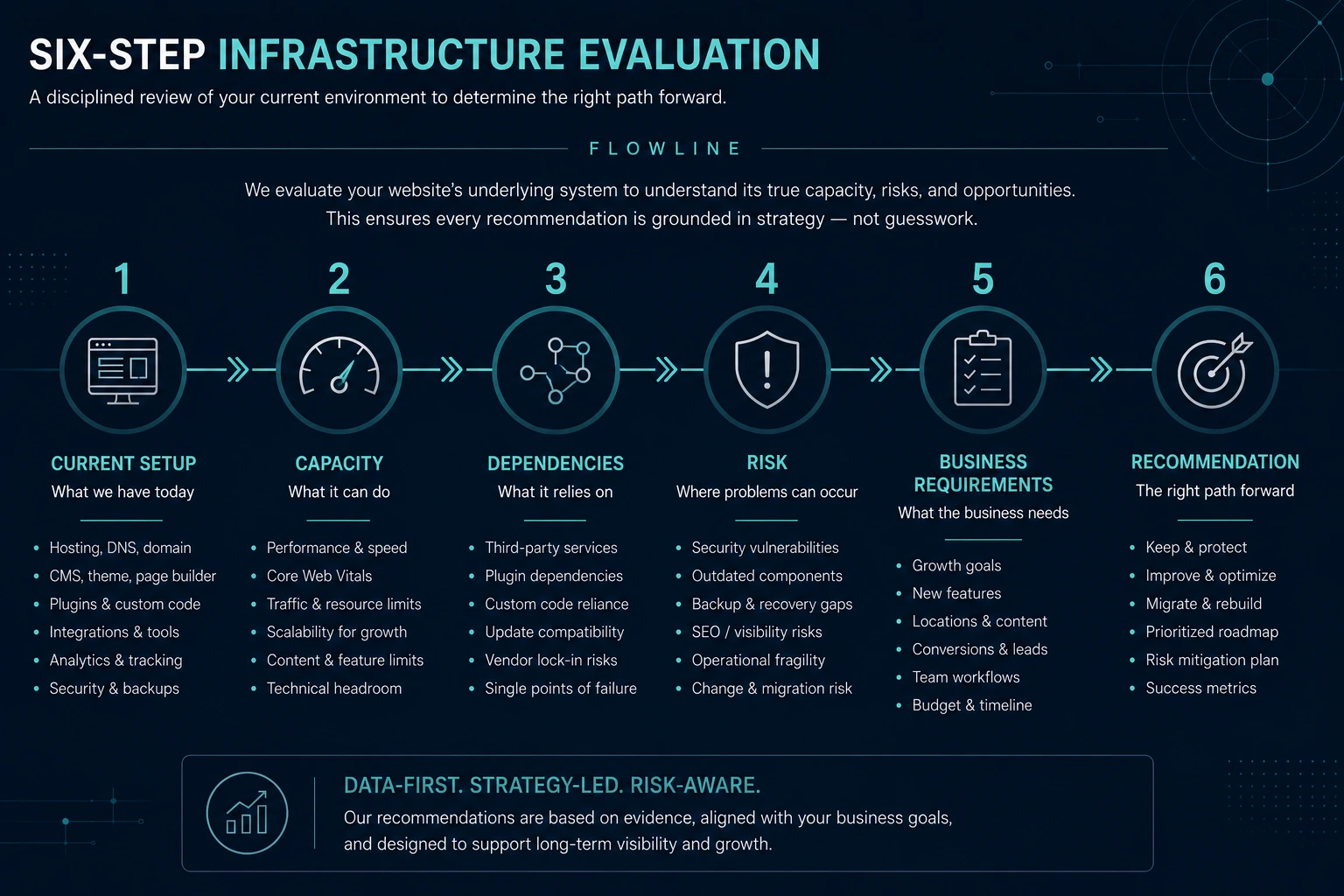
Current Setup → Capacity → Dependencies → Risk → Business Requirements → Recommendation.
CURRENT SETUP
What actually exists: registrar, DNS, origin host, CDN/proxy, SSL, CMS, builder, plugins, forms, analytics, backups, staging, admin accounts.
CAPACITY
Can it support more pages, traffic and crawl bursts, heavy media, forms, schema, campaigns—and a team editing safely without a developer for every change?
DEPENDENCIES
What breaks if we touch this: templates, tracking scripts, SMTP, DNS records for email, redirects, verification tokens, booking widgets, cache behavior.
RISK
What could be lost: rankings and URL equity, backlinks, Search Console and Analytics continuity, form delivery, uptime, data, access.
BUSINESS REQUIREMENTS
Who edits the site, how often content changes, how many leads the company can absorb, what data must remain accessible, acceptable maintenance cost.
RECOMMENDATION
Keep, improve or migrate—the smallest technically sound change that gives the business a durable advantage.
The platform recommendation follows the business model—not the other way around.
Sometimes the correct recommendation is to leave the platform alone.
Every infrastructure recommendation resolves to one of three outcomes. None of them is the “bad” answer—the evidence decides.
Keep
The current foundation is adequate for the plan. We document it, monitor it and protect what’s working.
- Reliable and stable
- Supports the growth plan
- Low risk of change
Improve
The platform stays. We fix the performance, backup, security, staging, access, tracking or maintainability gaps that are actually holding the site back.
- Targeted improvements
- Lower risk, faster results
- Better editability and measurement
Migrate
Only when the current environment materially blocks required capability or creates unacceptable operational, security or ownership risk—and the benefit justifies the complexity.
- Clear business or technical payoff
- URL mapping, redirects and monitoring
- One major variable at a time
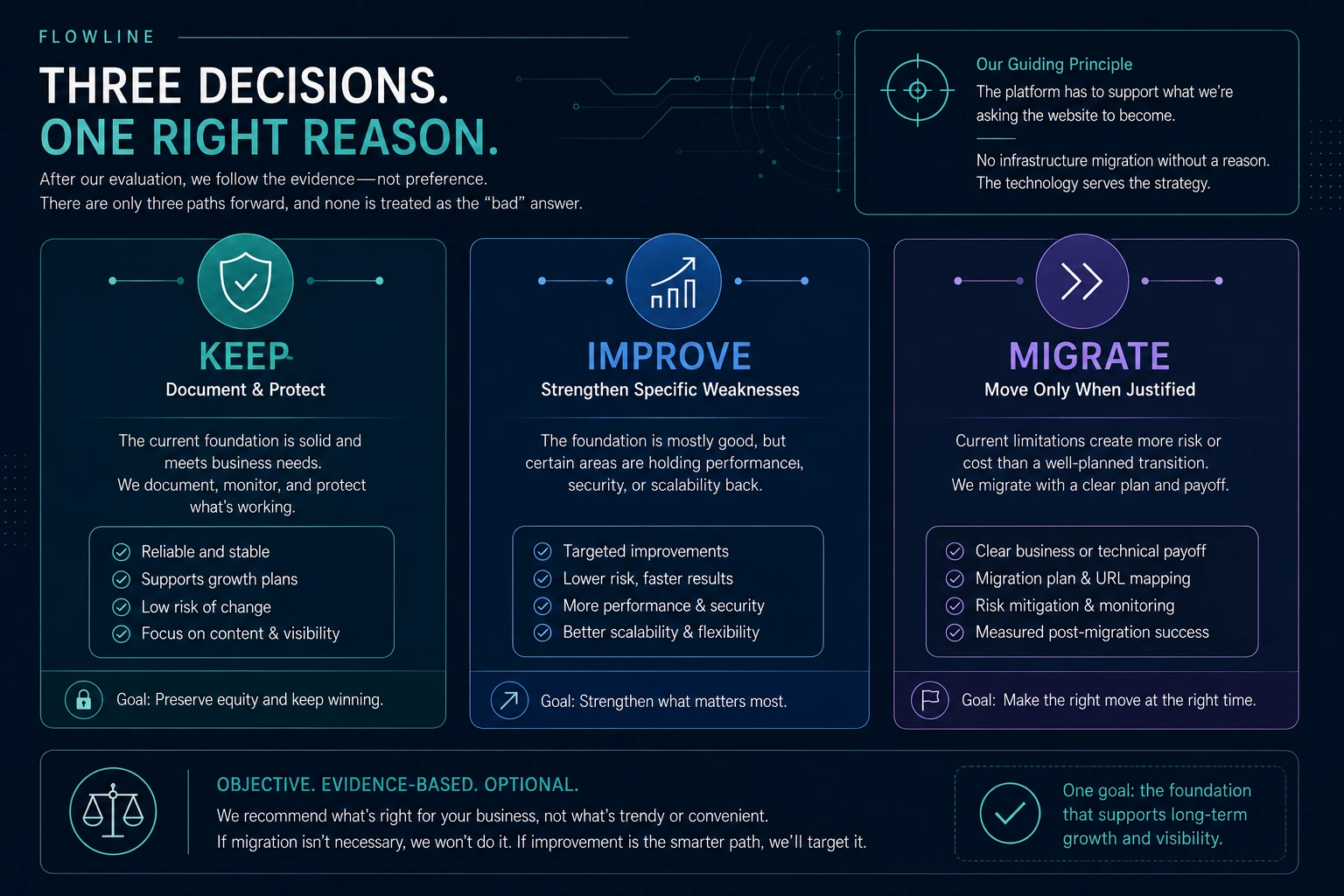
Keep / Improve / Migrate — three equal paths. No infrastructure migration without a reason; the technology serves the strategy.
This maps onto the wider FLOWLINE principle: Protect → Improve → Expand → Create.
Speed matters. Speed scores are not the strategy.
Google measures real-world user experience through Core Web Vitals and uses them in its ranking systems—while saying plainly that perfect scores don’t guarantee top rankings. We improve performance in proportion to the actual business and technical problem.
How quickly the main content loads.
How responsive the page feels when tapped.
Whether the layout stays still while loading.
- Page weight and media delivery
- Render-blocking scripts and styles
- Layout instability
- Caching, CDN and server response
- Redundant plugins and scripts
- “Fast sites rank higher.” Performance supports users, crawling and conversion—it isn’t a ranking guarantee.
- “Cloudflare improves SEO.” DNS, proxy and caching can improve delivery and reliability; that’s all.
- “You need a new host.” Only after the requirements analysis says so.
Google Search Central: Core Web Vitals and Page Experience documentation. The client’s measured March → August 2026 progression is on the case study.
Backups and staging are safeguards, not developer luxuries.
A foundation isn’t healthy just because it loads today. It needs a recoverable state, update discipline and a known rollback method. WordPress, Elementor and hosting vendors all recommend the same thing before major changes.
BACKUP
A full, verified backup of the live site and database—one that can actually be restored.
STAGING
Test consequential changes away from the production lead-generation site.
TEST
Functionality, performance, forms, responsive layouts and search signals.
DEPLOY
Deliberate, verifiable promotion—during a low-traffic window where possible.
VERIFY
The affected system, not just the page that was edited: links, forms, metadata, indexing.
ROLLBACK
The path back to the prior stable state is known before the change, not after.
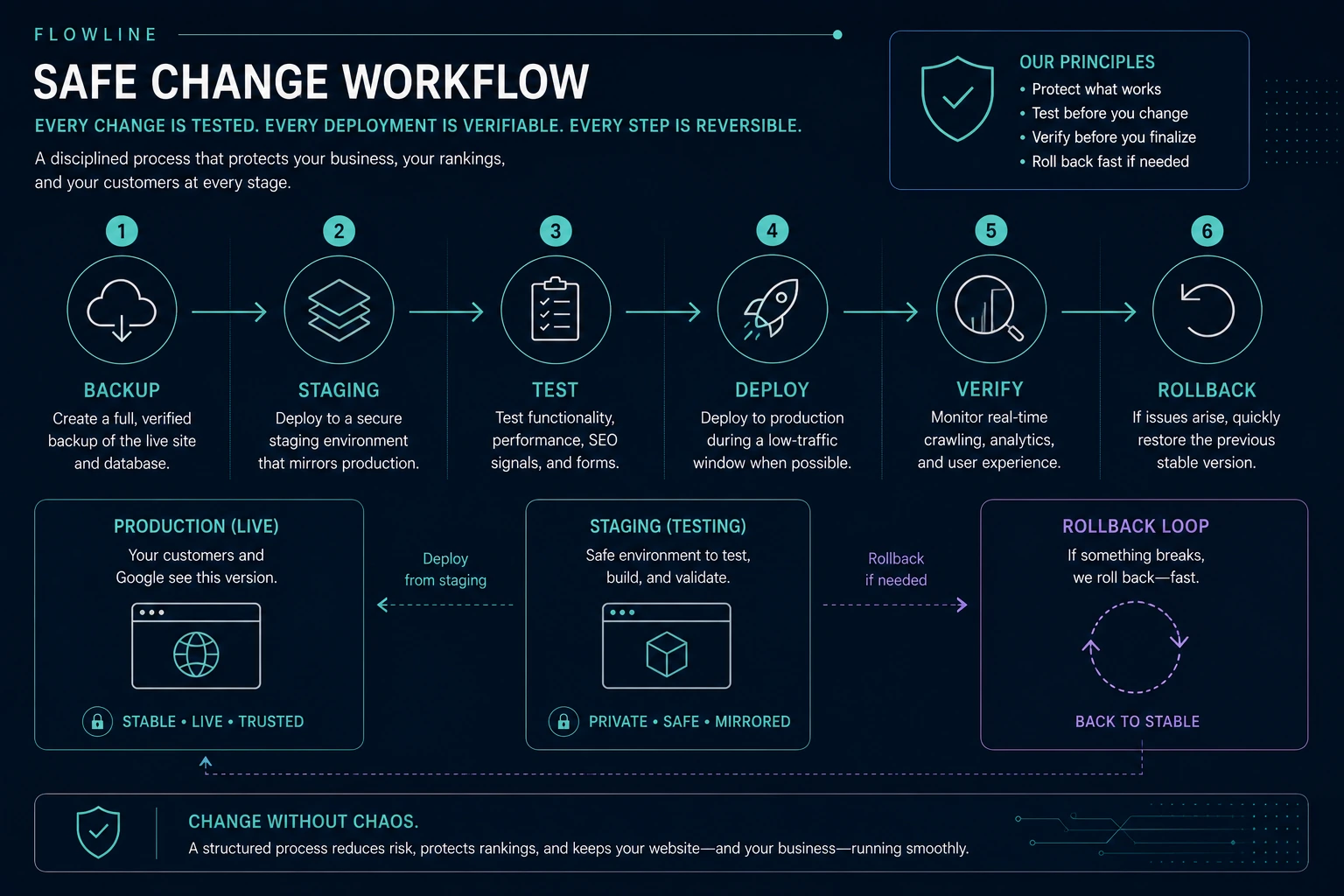
Backup → Staging → Test → Deploy → Verify → Rollback. Production stays separated from testing; the rollback loop returns to the prior stable state.
Staging reduces risk; it doesn’t eliminate deployment mistakes. QA and rollback still matter, and we never guarantee zero downtime during a migration.
You own the business. You own the assets.
The business remains the durable owner and admin of its critical digital assets. FLOWLINE works through granted access—delegated where the platform allows, revocable at any time. Search Console, Analytics and Ads are all designed for exactly this.
We don’t hold your website hostage. A company should be able to change vendors without losing its website or its history.
This is FLOWLINE policy, not a Google requirement.

Ownership map: the business at the center, FLOWLINE outside the circle as authorized access.
We separate the layers instead of calling them “the website.”
Domain, DNS, hosting, CMS, CDN/proxy, analytics and search accounts are different systems with different owners and different failure modes. Treating them as one vague service is how sites get broken.
A careless DNS change can take the website down, break company email, or disconnect services the business depends on—sometimes all three at once. Registrar, nameservers, records for web and email, rollback documentation.
Reliability and capacity for real traffic, crawl and PHP/database workload.
Version, theme, page builder—content kept natively editable.
Shortcodes, templates, tracking, custom code—audited before anything is removed.
Caching behavior, proxy layer, WAF—understood as its own layer.
Current software, least-needed access, strong authentication, monitoring.
Multiple restore points, tested restores, a known path back.
Major website work should not be tested on customers. Consequential changes tested off production on a staging copy, then promoted deliberately.
Whether Google can reach the information (crawlability) and has actually stored it as something it can show (indexing). Response codes, canonicals, redirects, sitemap, robots, mobile rendering, structured data.
If tracking is wrong, the company is making marketing decisions on bad evidence—worse than none, because bad evidence feels reliable. Search Console, Analytics, tags, call tracking—accessible to the business.
A form can appear to work perfectly while the messages never arrive: the customer thinks they contacted you, you think nobody called. SMTP delivery, CRM/webhook dependencies, lead handling.
Stack, licenses, access and owner accounts documented.
The existing platform was kept. The foundation was fixed.
Retained, not replaced
The existing WordPress/Elementor system stayed. Nothing was migrated for preference.
Layers understood separately
Hosting, DNS, CDN and cache behavior were treated as distinct systems with distinct owners.
Dependencies audited first
Plugins and custom functions were checked for shortcodes, templates, tracking and redirects before any removal.
Measured, editable, expandable
Performance improved materially through technical work while the site stayed editable and grew into a much larger search architecture.
Questions worth asking before anyone touches the site
What is crawlability?
Crawlability is whether search engines can reliably reach the pages on your website. If a page is blocked, broken, or only reachable through a link nothing points to, Google may never see it — no matter how good the content is.
What is indexing, and how is it different?
Indexing is whether Google has actually stored a page as something it can show in search results. Crawling is Google getting to the page; indexing is Google keeping it. A page has to pass both before it can appear in search at all.
Does a service-business website need structured data?
It helps. Structured data is a machine-readable summary of the facts on a page — what the business is, what service the page describes, where it operates. It does not rank a page by itself, but it removes guesswork for Google Search, Google Maps and AI search systems trying to describe your company accurately.
Let the evidence tell us whether your foundation needs anything at all.
We won’t destabilize a working business website to force it onto our preferred tools. We understand the platform, identify dependencies and risk, and recommend the smallest technically sound change that gives you a durable advantage.
Want to see what automated tools say about your current foundation?
The Website Test Lab launches the same free public checks we run at the start of a technical review — speed, security, and the structured information search engines read — and explains what each one can and cannot tell you.
If a rebuild is on the table, the Field Report on rebuilding without losing what already works covers what needs protecting first. SEO isn’t just rankings anymore explains why a clean technical score is only part of the picture.
If the foundation can support the work, the next question is whether the structure needs rebuilding or maintaining. Both are covered under services: a full website rebuild when the structure itself is the problem, or maintenance and ongoing support when it isn’t.
Typical investment
Typical timeframe: 1–3 weeks
A Foundation is a fixed piece of research work, not an open-ended engagement — and it is often what tells you whether the bigger project is needed at all.